

Texas company search helps users find tax-related records for businesses listed with the Texas Comptroller of Public Accounts. A taxable entity search can provide information such as an entity name, taxpayer number, entity type, current status, and other publicly available details. This type of search is useful for checking a company’s tax record, confirming business information, and reviewing the status of a Texas entity. Search results can vary based on the business name, taxpayer number, or other details entered into the search system.
Texas company search can be useful for businesses, researchers, and members of the public who need basic information about a Texas taxable entity. The Texas Comptroller’s search system focuses on entities connected with state tax records rather than federal business registrations. Results may show whether an entity is active, forfeited, or terminated, along with other available record details. Reviewing these records can help users verify a company’s information and distinguish tax-related entity records from records maintained by the Texas Secretary of State.
How to Use the Texas Taxable Entity Search
The Texas Taxable Entity Search provides a way to check tax-related information maintained by the Texas Comptroller of Public Accounts. A Texas Company Search for taxable entity records can start with an entity name, taxpayer number, Federal EIN, or Texas SOS file number. The steps below explain how to enter the information, review search results, and check the available Comptroller records.
- Texas Comptroller — Franchise Tax Account Status Search:
- https://comptroller.texas.gov/taxes/franchise/account-status
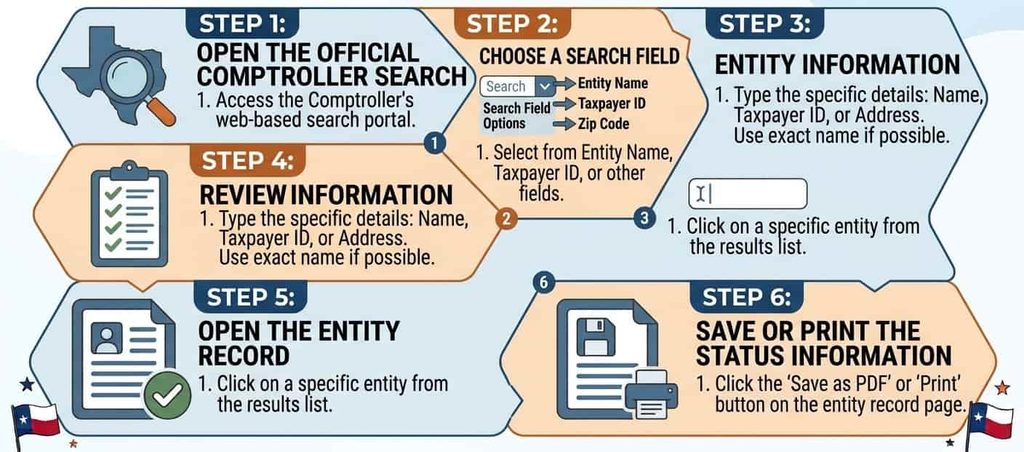
Open the Official Comptroller Search
Start with the official Texas Comptroller search page for taxable entities. The search page is maintained by the Texas Comptroller of Public Accounts and is used to check tax-related entity records. Open the search page and review the available search fields before entering information. The official search reflects Comptroller records available at the time of the query.
Choose a Search Field
The Comptroller taxable entity search provides several ways to locate a business record. Depending on the information available, you can search using an entity name, 11-digit taxpayer number, Federal EIN, or Texas SOS file number. The taxpayer number identifies the Comptroller account, the EIN identifies a federal tax account, and the SOS file number connects with a Secretary of State entity record.
Enter the Entity Information
Enter the available information in the matching search field. For an entity name search, use the business name as accurately as possible. Check spelling, punctuation, and the legal name shown in business records. For a taxpayer number, EIN, or SOS file number, enter the complete number without unnecessary characters. Accurate information can reduce unrelated matches and make the search results easier to review.
Review Matching Results
After submitting the search, review the returned search results for the correct business entity. Compare the entity name with the information you already have. Comptroller records can show details such as the Texas taxpayer number, mailing address, state of formation, SOS file number, registered agent, registered office, and right to transact business. If multiple records appear, compare several identifying fields before selecting the relevant entity record.
Open the Entity Record
Select the matching business record to review its available status information. The detailed Comptroller record can provide tax-related information connected with the entity. Review the taxpayer number, entity name, SOS registration details, registered agent information, and right to transact business. Keep in mind that Comptroller records and Secretary of State records serve different purposes, so an SOS filing record may be needed for formation or filing-history details.
Save or Print the Status Information
The Comptroller states that search results can be printed and reflect its records at the time of the query. After reviewing the Texas Taxable Entity Search results, you can print the displayed information for your records. Keep the query date with the printed result, since the information may change as Comptroller records are updated.
What Can You Search in the Texas Comptroller Database?
The Texas Comptroller database provides several search options for locating taxable entity records. Depending on the information available, a user can search with a taxpayer number, Federal EIN, entity name, or Texas SOS file number. Each identifier connects the search to a different type of business information. The available search fields can help locate the relevant Comptroller record and review tax-related entity details.
Search by Taxpayer Number
The 11-digit Texas Comptroller Taxpayer Number identifies a taxpayer account maintained in Comptroller records. It provides a direct way to locate the tax account associated with a taxable entity. This search method can be useful when the taxpayer number is already known from a tax notice or other Comptroller record. Entering the complete Texas taxpayer number can help locate the relevant entity without relying on a name-based search.
Search by Federal EIN
A Federal EIN is a nine-digit identification number issued by the IRS for federal tax purposes. It differs from the Texas taxpayer number, which identifies an account in Texas Comptroller records. The Comptroller search allows a Federal EIN to be entered in the Taxpayer Number field. This provides another way to perform a taxable entity lookup Texas search when the federal identification number is available.
Search by Entity Name
An entity name search uses the legal name of the business to locate its Comptroller record. Enter the complete legal name when available and check the spelling carefully. A name-based Texas taxable business search can return records with similar names, so review the entity details before selecting a result. The taxable entity search can then be used to compare the entity name with other identifying information shown in the record.
Search by Texas SOS File Number
A Texas SOS file number is assigned to a business record maintained by the Texas Secretary of State. The number can be used as an entity identification field in the Comptroller search. It differs from the taxpayer number, which identifies the Comptroller tax account. Using the Texas SOS file number can help connect a Secretary of State entity record with related Comptroller records and confirm that the correct business is being reviewed.
What Information Does a Texas Taxable Entity Search Show?
A Texas Taxable Entity Search can return several fields from Texas Comptroller records. The available information can include the entity name, Texas taxpayer number, mailing address, right to transact business, state of formation, SOS registration details, effective SOS registration date, and registered-agent information. These taxable entity search fields help connect a business record with its tax account and related state registration information.
Entity Name
The entity name identifies the taxable business record shown in the Comptroller database. It can be compared with the legal name used in other business records to confirm that the search result belongs to the intended entity. A matching entity name can help distinguish similar businesses listed in Comptroller records.
Texas Taxpayer Number
The Texas taxpayer number is an 11-digit identifier associated with the entity’s Comptroller tax account. It helps connect the business with its tax-related record and can be used as a search field. When reviewing Comptroller records, the taxpayer number can help distinguish an entity from another business with a similar or identical name.
Mailing Address
The mailing address is the address shown in the Comptroller record for the taxable entity. It can help confirm that a search result matches the business being researched. The mailing address is a Comptroller record field and should not automatically be treated as the entity’s registered office or principal business location.
Right to Transact Business in Texas
The right to transact business field shows the entity’s status under the Comptroller’s Franchise Tax Account Status system. The Comptroller describes this status as relating to an entity’s right to transact business in Texas. A forfeited status can result when required franchise tax obligations are not met and the statutory process is completed. The status can matter for business and financial transactions, since the Comptroller states that a printed status result may be required for some real estate or financial transactions.
State of Formation
The state of formation identifies the jurisdiction where the entity was formed or organized. This field can help distinguish a Texas entity from a business formed in another state but registered to conduct business in Texas. It is one of the identifying fields that can appear in Comptroller records.
SOS Registration Status
Comptroller records can include information connected with an entity’s Texas Secretary of State registration. This information should be read separately from the Comptroller’s tax-related status. The Texas Secretary of State remains the primary source for state entity filings, formation records, and other SOS filing matters. The Comptroller itself directs users to the SOS for certain registration actions.
Effective SOS Registration Date
The effective SOS registration date indicates the date associated with the entity’s registration with the Texas Secretary of State. This field can help establish when the entity’s Texas registration became effective. It can appear alongside the Texas SOS file number and other entity identification details in Comptroller search results.
Registered Agent and Registered Office
Comptroller records can show the registered agent name and registered office street address associated with an entity. These fields can help identify the business record and connect it with its Secretary of State registration. The information should be checked against current SOS records when filing or registration details are required.
What Does “Right to Transact Business” Mean?
The right to transact business is a status shown through the Texas Comptroller’s Franchise Tax Account Status system. It indicates whether the entity currently has the Comptroller-recognized right to transact business in Texas. The status is tied to franchise tax reporting and related account requirements rather than serving as a complete statement of every aspect of an entity’s legal standing.
Relationship With Franchise Tax
Texas franchise tax requirements can affect an entity’s right to transact business. The Comptroller states that an entity can face forfeiture of this right when it does not meet applicable franchise tax filing requirements. The statutory process includes notice before the actual forfeiture, giving the entity a period to cure applicable deficiencies.
Active Status
An active right-to-transact status indicates that the Comptroller’s records show the entity’s right to transact business as active at the time of the search. Search results are time-specific, so a printed result represents the Comptroller records available when the query was made.
Loss or Forfeiture of the Right
If the Comptroller forfeits an entity’s right to transact business, the consequences can include denial of the entity’s right to sue or defend itself in a Texas court. Texas law can impose certain liability on officers, directors, partners, members, or owners for specified debts. These effects are tied to the statutory forfeiture process.
Why the Status Can Matter
The right to transact status can be relevant when a business record is being checked for a transaction, financing matter, or other situation where current tax-related standing matters. The Comptroller states that a Franchise Tax Account Status result may be required for certain real estate or financial transactions.
Read the Status as a Current Record
A Comptroller status result reflects the agency’s records at the time of the query. It should be treated as a current record rather than permanent proof of future status. Tax filings, payments, notices, and other account changes can affect the record after a search is completed.
How Franchise Tax Affects Entity Status
Texas franchise tax is administered by the Texas Comptroller and applies to taxable entities formed or organized in Texas or doing business in Texas. Taxable entities may have franchise tax reporting duties based on current Texas tax rules and their business status. Reviewing franchise tax information can help explain the tax-related status shown in the Texas Comptroller database and its connection with an entity’s right to transact business in Texas.
Franchise Tax Account Status
The Franchise Tax Account Status connects an entity’s tax account with its right to transact business in Texas. The Texas Comptroller search allows users to check this status and review information maintained in the agency’s records. This record serves a different purpose from the formation and filing records maintained by the Texas Secretary of State.
A Comptroller status result can help show:
- The entity’s tax-related account status
- The right to transact business in Texas
- Related Texas taxpayer information
- Information maintained by the Comptroller at the time of the search
Filing Obligations
A taxable entity may need to file a franchise tax report along with a Public Information Report or Ownership Information Report, depending on current reporting rules and the entity’s circumstances. Some entities may have different filing duties based on revenue, entity type, or other tax requirements.
Reporting records can include:
- Franchise tax report
- Public Information Report (PIR)
- Ownership Information Report (OIR)
- Other filings required under applicable Texas tax rules
Tax Deficiencies and Forfeiture
Unresolved franchise tax filing or payment issues can affect an entity’s tax account status. The Texas Comptroller states that failure to meet required franchise tax filing requirements can result in forfeiture of the right to transact business, subject to the required notice and cure process.
Issues may involve:
- Missing required franchise tax filings
- Unresolved tax account requirements
- Failure to meet applicable reporting duties
- Forfeiture of the right to transact business
Right to Transact and Entity Status
The connection between franchise tax and the right to transact business means tax-related compliance can affect the status displayed in the Comptroller database. A forfeiture of the right to transact business is a Comptroller-related tax status matter.
The two agencies maintain different types of records:
- Texas Comptroller: franchise tax and taxable entity information
- Texas Secretary of State: entity formation and filing records
- Comptroller status: right to transact business
- SOS records: registration and filing history
Reading the Status Correctly
A Texas business may have a Secretary of State registration record that remains available in the SOS system yet require a separate review of its Comptroller franchise tax status. A broader Texas business record check can compare information from both agencies.
When reviewing an entity, check:
- Registered agent and registered office information
- Texas Comptroller tax account status
- Right to transact business
- Texas SOS registration status
- SOS file number
- Formation and filing information
How to Read Texas Taxable Entity Search Results
Texas Taxable Entity Search results provide tax-related information maintained by the Texas Comptroller. The results can show an entity’s taxable status, franchise tax status, tax account details, and right to transact business. The Texas Secretary of State maintains separate entity records, so an SOS registration status should be reviewed as a different data point. Reading both records together can help users identify what each agency’s status means.
Active / Current Status
An active or current result generally indicates that the entity’s tax account or right to transact business is shown as current in the Comptroller records at the time of the search. The result reflects the agency’s records when the search is performed.
Look for:
- Current tax account status
- Active right to transact
- Current entity information
- Texas taxpayer number
Franchise Tax Forfeiture or Ended Status
A franchise tax forfeiture status can indicate that required franchise tax obligations were not met and the entity’s right to transact business was forfeited under applicable Texas procedures. The Comptroller provides notice and a cure period before forfeiture. An ended or inactive tax-related result should be reviewed carefully to determine what status the Comptroller record is reporting.
Check for:
- Franchise tax status
- Right to transact
- Tax filing issues
- Forfeiture information
SOS Registration Status
SOS registration status relates to the entity record maintained by the Texas Secretary of State. It can show registration-related information that is separate from the Comptroller’s franchise tax account. The SOS bussiness record is the relevant source for formation, filing history, and other Secretary of State records.
Review:
- SOS registration status
- SOS file number
- Formation information
- Filing history
Why Two Status Fields Can Matter
Tax status and SOS registration status are related but distinct data points. A business record can contain information from both systems, yet each agency reports a different type of status. The Comptroller focuses on tax account and right to transact information, whereas the SOS maintains entity registration and filing records. Comparing both can provide a clearer picture of the business record and show which agency maintains the information being reviewed.
Texas Taxable Entity Search vs Texas SOSDirect
The Texas Comptroller and Texas Secretary of State maintain different categories of business information. The table below shows which source to use for each type of Texas business record.
Frequently Asked Questions
Texas Comptroller Entity Search questions often focus on taxable entity records, business names, taxpayer numbers, EIN searches, and tax-related status. The FAQs below explain how the Comptroller Business Search works, what information a search can show, and how different business identification numbers can be used to locate a Texas entity record.
What is the Texas Comptroller Entity Search?
The Texas Comptroller Entity Search is an online search system for finding tax-related information about Texas taxable entities. It is commonly referred to as the Taxable Entity Search. A search can be performed using an entity name, Texas taxpayer number, Federal EIN, or Texas SOS file number. Results can show information such as the entity name, taxpayer number, registered agent, and right to transact business.
Is the Texas Comptroller Business Search free?
The Texas Comptroller Business Search provides online access to taxable entity records without a stated search fee. This makes it useful for a free entity search when you need basic Comptroller information. Search results can include tax-related details such as the Texas taxpayer number, entity name, state of formation, registered agent, and right to transact business. Separate fees may apply to certain official documents or other tax-related requests.
How do I search for a Texas business by name?
To perform a Texas business lookup, enter the business entity name in the Comptroller search system. Use the legal entity name when available and review the matching results carefully. A Texas business entity lookup Comptroller search can show the entity name, taxpayer number, SOS file number, registered agent, and right-to-transact information. Comparing these details can help identify the correct business when several entities have similar names.
Can I search the Comptroller database by EIN?
Yes. The Texas Comptroller search allows a Federal Employer Identification Number, or EIN, to be entered in the Taxpayer Number field. An EIN is a nine-digit federal tax identification number issued by the IRS. Using the EIN can help locate a related Texas taxable entity record and review information held by the Comptroller, such as the taxpayer number, entity name, and right to transact business.
What is a Texas taxpayer number?
A Texas taxpayer number is an 11-digit identification number used by the Texas Comptroller to identify a taxpayer account. It is different from a Federal EIN and a Texas SOS file number. The taxpayer number can be used in the Comptroller search to locate a business record and review tax-related information. It can appear with the entity name, mailing information, SOS file number, and other Comptroller records.