

Texas company search helps users find public business records associated with companies registered in Texas. A business entity lookup can show details such as the legal business name, entity type, filing status, registration date, and registered agent information. These records can help entrepreneurs, customers, investors, and business partners verify basic company information before making decisions. Texas public records may include corporations, LLCs, partnerships, and other registered entities, making a business name search useful for checking whether a company is active and properly registered.
Texas company search can be useful for checking a business before forming a new company, starting a partnership, reviewing a potential vendor, or confirming existing registration details. Users can search by business name or other available identifying information to locate the relevant entity record. Company records may contain filing details, office information, and status updates that help confirm a business’s current registration. Reviewing these details can provide a clearer picture of the company record and support informed business research.
What Is a Texas Business Entity Search?
Texas Business Entity Search is a way to find public information about businesses registered with the Texas Secretary of State. A search can help identify a company’s legal business name, entity type, registration status, filing information, and other records available through the state’s business records system. This information can be useful for checking whether a company is registered in Texas, confirming a business name, or reviewing basic details before working with a company.
How to Search a Texas Business Entity by Name
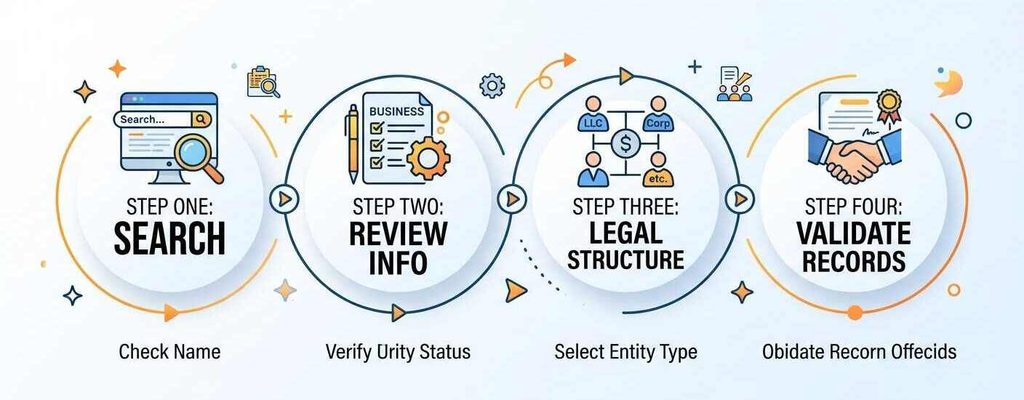
Searching a Texas business entity by name can help you locate a company record using the name associated with its state filing. A business entity lookup Texas search works best when you begin with the most distinctive part of the company name and then narrow the results by reviewing available details. The process can help confirm whether a business is registered under a particular legal business name and whether the record matches the company you are looking for. A careful name search can reduce confusion when several Texas businesses have similar names.
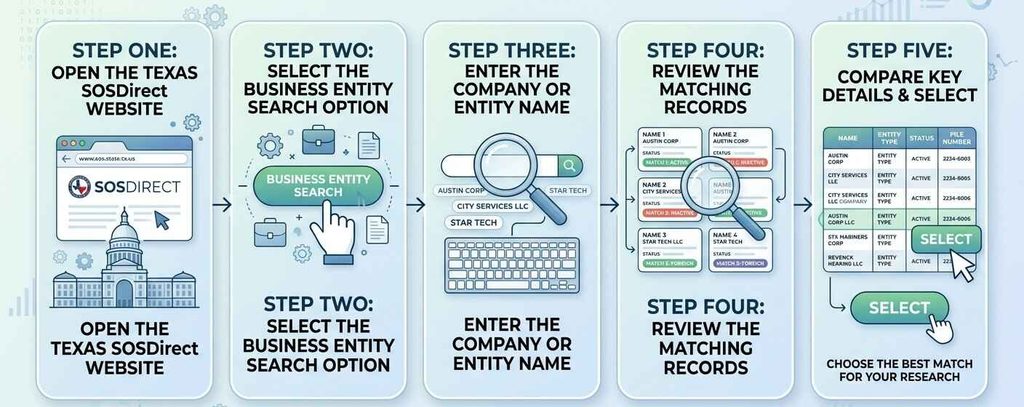
For an official Texas business entity search, the Texas Secretary of State provides its SOSDirect online system. Users can enter a business or entity name to look for matching records and compare the results with the company they are researching. This is useful when several businesses have similar names and you need to identify the correct record.
- Official Texas SOSDirect:
- https://direct.sos.state.tx.us/acct/acct-login.asp?
How to Search Texas Business Entities by File Number
A Texas Entity Search can be performed with a company name or a unique filing identifier. A file number is useful when you already have the number associated with a business record and want to locate that specific entity. This method can reduce unrelated matches that may appear in a broad name search.
What Is a Texas SOS File Number?
A Texas SOS file number is an identification number assigned to a business entity record by the Texas Secretary of State. It helps identify a particular filing record maintained by the state. The SOS file number can be useful when several companies have similar or closely related names.
Key points about a Texas file number include:
- Assigned by the Secretary of State: It identifies a business entity record in the state filing system.
- Unique record reference: It can help separate one entity from another with a similar name.
- Useful for precise searches: A known file number can narrow the search to a particular business record.
- Different from a taxpayer number: A taxpayer number relates to state tax matters, while the SOS file number identifies the entity record.
Entity Search by File Number
An entity search by file number is useful when you already have the file number from a state filing, business document, or previous record. Enter the number in the appropriate search field within the Texas Secretary of State’s business search system. A Texas SOS file number can provide a more precise result than a broad name search. A name search may return several businesses with similar names, while a file number points to a particular entity record.
Benefits of using the file number include:
- Provides a direct reference for state filings
- Reduces similar-name results
- Helps locate a specific entity record
- Makes record identification easier
How to Search by Taxpayer Number or EIN
A business entity lookup Texas search can use different identifiers depending on the type of record you need. The Texas Comptroller of Public Accounts maintains tax-related records that can be searched using a Texas taxpayer number and, in certain Comptroller search tools, a federal EIN. These identifiers are separate from the Texas Secretary of State file number and serve different purposes.
Entity Search by Taxpayer Number
The Texas taxpayer number is an 11-digit number issued to an individual or entity by the Texas Comptroller of Public Accounts. It is used to identify the taxpayer’s account within Comptroller records. The Comptroller’s current Franchise Tax Account Status Search accepts this number as a search field. An entity search by taxpayer number can be useful when you already have the company’s Comptroller-issued number. The number can help locate the relevant tax account without relying on a business name that may have similar matches.
Key points include:
- Taxpayer number: An 11-digit number issued by the Texas Comptroller.
- Issuing agency: Texas Comptroller of Public Accounts.
- Primary use: Identifies the entity or taxpayer within Comptroller records.
- Search purpose: Helps locate tax-related entity information more precisely.
Can You Search a Texas Business by EIN?
An EIN, or Federal Employer Identification Number, is a 9-digit federal identifier issued by the Internal Revenue Service. It is different from the Texas taxpayer number, which is issued by the Texas Comptroller. The Texas Comptroller’s current Franchise Tax Account Status Search specifically provides an EIN search field labeled Federal EIN and accepts a 9-digit number. This does not mean the Texas public business search is an unrestricted national EIN database. Rather, an EIN can be used where the applicable Comptroller search interface accepts it as an identifier.
What Information Can You Find in a Texas Entity Search?
A Texas business entity search can provide several details about a company’s state record. The information available can help users identify the correct business entity, check its current entity status, see its formation date, review its registered agent, and examine its filing history. The record can be useful for confirming basic registration details and distinguishing one company from another when multiple businesses have similar names.
Entity Name and Entity Type
The entity name is the legal name recorded for the business entity. The record may identify the organization as an LLC, corporation, partnership, nonprofit, or another recognized entity type. Checking both the legal name and entity type helps confirm that the search result belongs to the business being researched.
Entity Status
The entity status indicates the current standing shown in the state record. A record may show an entity as active, inactive, forfeited, or terminated, depending on its filing and state status. These terms can carry different meanings and should be read in the context of the record.
Status information may help show:
- Whether the entity has an active SOS registration status
- Whether the record is inactive or terminated
- Whether the entity has a forfeited status
- Whether the business has the right to transact business in Texas
Formation Date
The formation date shows when the business entity was formed or registered with the state. Users may check this date when reviewing a company’s history, confirming how long an entity has existed, or comparing records with other businesses that have similar names. It can provide a useful reference point for reviewing later filings and changes.
Registered Agent
A registered agent is the person or organization designated to receive official documents for a business. Entity records may show the agent’s name and registered office address. This information is relevant for service of process, including delivery of legal notices and other official documents to the business through its designated representative.
Filing History
A company’s filing history can show documents submitted during the life of the business entity. Depending on the record, filings may relate to formation, amendments, name changes, mergers, termination, or other corporate actions. Reviewing the filing history can help establish a timeline of changes involving the business. It may show when the original entity was created, when its information was updated, and whether significant structural or registration changes were filed with the state.
How to Check If a Texas Business Is Active or in Good Standing
Checking a Texas business record can involve more than one status field. The Texas Comptroller of Public Accounts provides a Franchise Tax Account Status that relates to an entity’s right to transact business in Texas. The Secretary of State maintains its own registration information. These records address different aspects of a business’s state status, so checking the appropriate source can provide a clearer picture of an entity’s current position.
What “Right to Transact Business” Means
The right to transact business is the Comptroller-side status associated with a taxable entity’s franchise tax account. The Comptroller describes its Franchise Tax Account Status as the status of an entity’s right to transact business in Texas. This status can be affected when a taxable entity does not meet applicable franchise tax filing requirements. The Comptroller’s search can show whether the entity’s right to transact business is current or has been forfeited. A forfeiture can occur when required franchise tax filings and related requirements are not satisfied. The status reflects the Comptroller’s records at the time of the search.
What “SOS Registration Status” Means
The SOS registration status relates to the entity’s registration record with the Texas Secretary of State. It is separate from the Comptroller’s Franchise Tax Account Status. An entity can have information in both systems, but each agency maintains records for different purposes. The Comptroller itself states that its Franchise Tax Account Status is a summary for standard business needs and that specific matters involving reinstatement or termination with the Secretary of State may require a certificate specific to the SOS filing.
Why You Should Check Both Statuses
Checking both fields can provide a more complete picture of an entity’s status. The right to transact business relates to the Comptroller’s franchise tax records, while the SOS registration status relates to the Secretary of State registration record. They should not be treated as interchangeable.
For a more complete business record check, compare:
- Entity status shown by the relevant state record
- Right to transact business shown by the Comptroller
- SOS registration status maintained by the Secretary of State
- Applicable franchise tax information for the taxable entity
How to Find a Texas Registered Agent
A registered agent is a person or organization designated by a Texas entity to receive official documents and legal notices on its behalf. The agent provides a contact point for service of process, such as the delivery of a lawsuit or other legal document. Texas business entities are required to maintain a registered agent and registered office in the state. The agent’s information can change, so current records are more useful than older documents.
Where to Find Registered Agent Information
The registered agent’s name and registered office address can be found through the Texas Secretary of State’s business records. For an official business entity lookup Texas search, users can use SOSDirect to locate the relevant entity record and review available filing information. When reviewing a Texas entity, compare the registered agent information shown in the current record with the information in any documents you already have. A registered agent may be an individual or an authorized organization, and the registered office serves as the physical address for receiving official documents. The Texas Secretary of State and Comptroller of Public Accounts maintain separate records for different purposes. A registered agent listed in an SOS record should not automatically be treated as identical to information shown in Comptroller records. For the current registered agent, the Secretary of State’s entity record is the relevant state source to check.
Texas Comptroller vs. SOSDirect
Texas business information is maintained through two main state systems. The Comptroller focuses on tax-related information, while SOSDirect focuses on entity registration and filing records. The search you use depends on the type of business information you need.
How to Check a Texas Business’s Filing History
A Texas business’s filing history can show how an entity’s state record has changed over time. The Texas Secretary of State maintains business records that may include formation documents, amendments, name changes, and other filings submitted by an entity. Reviewing these public records can help establish a timeline of important changes and provide more context than the current entity record alone.
What Can Appear in a Filing History?
Depending on the entity and its filings, the record may contain documents related to:
- Certificate of Formation — The document used to create a Texas entity.
- Amendments — Filings that update information in the entity’s governing documents or state record.
- Name changes — Documents showing an approved change to the entity’s legal name.
- Registered-agent changes — Filings that update the registered agent or registered office.
- Mergers or conversions — Records documenting these transactions when applicable to the entity.
- Termination or reinstatement — Filings showing when an entity was terminated or later reinstated.
How to Review or Order Documents
Users can locate a business record through SOSDirect and review the available filing information for the selected entity. When a particular document is needed, document ordering options can be used to request copies of eligible filings or other available business records.
- Texas SOSDirect Business Entity Search:
- https://direct.sos.state.tx.us/acct/acct-login.asp?utm_source=chatgpt.com
When reviewing a filing history, check the filing dates and document types to place each change in chronological order. Some historical documents may require an order or applicable fee rather than being available for immediate online viewing.
Texas Business Name Availability vs. Entity Search
A Texas Entity Search and a business name availability search serve different purposes. An entity search focuses on businesses that already have records with the state, while business name availability relates to whether a proposed name may be used for a new filing. Keeping these searches separate helps users avoid treating an existing business record as confirmation that a new name is available.
How to Get a Texas Certificate of Fact or Business Records
A Texas business may need an official certificate or a copy of documents filed with the Secretary of State. Through SOSDirect, users can order certificates and retrieve plain or certified copies of eligible business records. The Texas Secretary of State uses the term Certificate of Fact – Status for a certificate that provides official evidence of an entity’s existence or authority to transact business in Texas.
What Is a Certificate of Fact?
A certificate of fact is a certificate issued by the Texas Secretary of State concerning information associated with a business organization. One commonly requested type is the Certificate of Fact – Status, which provides the entity’s current legal name, formation or registration date, and a statement of its status. It can serve as official evidence of an entity’s existence or authority to transact business in Texas. The SOS also allows other fact types to be selected when ordering a certificate, depending on the information required.
Certificate of Fact vs. Certificate of Status
Texas terminology can vary depending on the requester and the agency involved. The Secretary of State identifies Certificate of Fact – Status as its official term. A certificate of status or certificate of existence may be used by people referring to similar proof of an entity’s current standing or existence. The Texas Secretary of State states that its Certificate of Fact – Status is equivalent to what is sometimes called a Certificate of Good Standing or Certificate of Existence. This should not be confused with the Comptroller’s separate Certificate of Account Status, which relates to franchise tax records.
Plain Copies vs. Certified Copies
| Feature | Plain Copies | Certified Copies |
|---|---|---|
| Purpose | Record review and internal use | Official or formal use |
| Certification | Not certified | Certified by Texas Secretary of State |
| Common Uses | Business records and filing review | Banks, legal matters, contracts, financing, government filings |
| Ordering | Available through SOSDirect | Available through SOSDirect |
| Fee | Depends on the document | $15 certification fee + $1 per page |
Frequently Asked Questions
The Texas Business Entity Search process can raise questions about search methods, available records, filing information, and business status. The FAQs below address common questions about searching by entity name, file number, or taxpayer number and explain the difference between Comptroller records and SOSDirect. They can help clarify which Texas state system is relevant for the type of business information you need.
Is the Texas Business Entity Search free?
Some Texas business searches are free, while certain SOSDirect services have fees. The Texas Comptroller provides a free search for taxable entity information. SOSDirect is used for Secretary of State records, and fees may apply when ordering documents, certificates, or copies. The search cost can depend on the type of information or document requested.
How do I search for a business in Texas?
Start with the company’s entity name or another identifier you have, such as an SOS file number. The Texas Comptroller can be used for tax-related entity information, while SOSDirect provides Secretary of State registration and filing records. Compare the entity name, type, status, and other available details to identify the correct business record.
What is the difference between Texas Entity Search and Texas Entity Lookup?
Texas Entity Search and Texas Entity Lookup are commonly used phrases for finding information about a Texas business entity. They can describe the same general task, but they are not necessarily the names of separate state databases. The official search system depends on the type of information being requested, such as tax records or Secretary of State filings.
Can I search a Texas business by file number?
Yes. An entity search by file number can be used when you have the SOS file number associated with a Texas entity. A file number can provide a more precise result than a broad name search, especially when several businesses have similar names. SOSDirect is the relevant Secretary of State system for entity records and filing information.
Can I search by taxpayer number?
Yes. The Texas Comptroller uses an 11-digit Texas Taxpayer Number to identify a taxpayer account. This number is different from the SOS file number and federal EIN. The Comptroller’s taxable entity search can use the taxpayer number to locate applicable tax-related business information.