

Texas company search provides a practical way to find business records filed with the Texas Secretary of State. A company name lookup can help users check registered entities, filing details, entity status, and other public business information. The search process is useful for entrepreneurs checking a proposed business name, companies reviewing another entity, and users verifying registration details. Texas business records can cover corporations, limited liability companies, partnerships, and other entity types registered with the state.
Texas company search can help users locate a business record using available search information and review details connected with a registered entity. Secretary of State records may contain information related to formation filings, registered agents, entity status, and filing history. Reviewing these records can help confirm whether a business appears in the state’s records and provide useful details for business research. Search results may vary based on the information entered and the type of record being requested.
What Is the Texas Secretary of State Business Search?
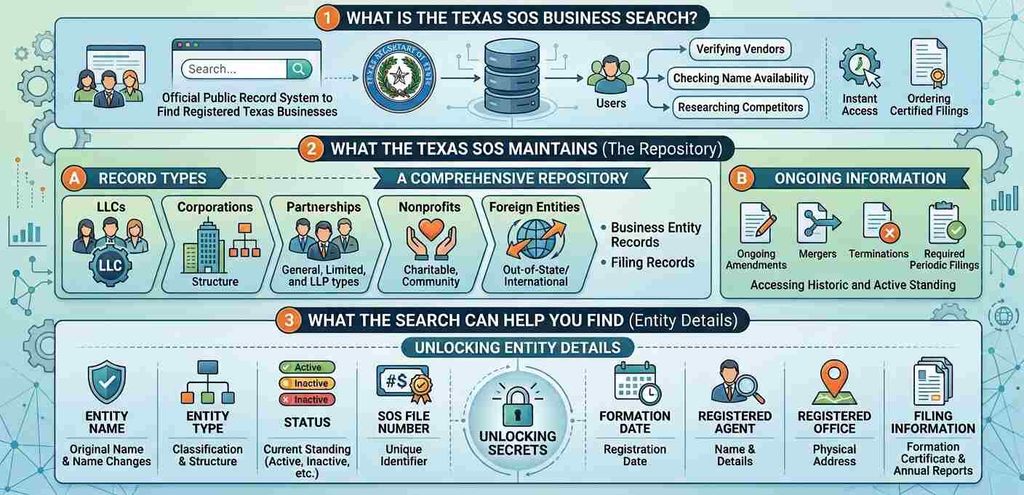
The Texas Secretary of State Business Search is a way to find records connected to businesses registered with the state. It can help users locate a business entity and review key details recorded by the Texas Secretary of State. Searches can be performed using information such as an entity name or SOS file number. The records can cover different types of organizations, including LLCs, corporations, partnerships, nonprofits, and foreign entities registered to conduct business in Texas.
How to Use the Texas SOSDirect Business Search
The Texas SOSDirect Business Search provides a way to locate business entity records maintained by the Texas Secretary of State. Users can start with a business name, a Texas SOS file number, or other available identifying details. The search process can help locate an LLC, corporation, partnership, nonprofit, or other registered business entity. Once a matching record appears, users can review basic entity information and available filing details. The steps below explain how to use SOSDirect and review search results efficiently.
Open SOSDirect
Start by opening the official SOSDirect system provided by the Texas Secretary of State. SOSDirect is the state’s online system for business entity records and other Secretary of State filings. From the system, users can reach the business organization inquiry and search functions. You may need to sign in or follow the system’s instructions before using certain features. For the official Texas SOSDirect search page, use:
- Texas SOSDirect Business Entity Search:
- https://direct.sos.state.tx.us/acct/acct-login.asp
Choose the Business Entity Search Option
After opening SOSDirect, select the business organization inquiry or entity search function available in the system. This area is used to locate records for Texas business entities. The available search fields can vary based on the search option selected. Choose the field that matches the information you have, such as a business name or Texas SOS file number. This helps narrow the results before you review individual business records.
Search by Business Name
A business name search can be useful when you know the company’s legal name or only part of it. Enter the exact legal name if you have it, then review the results for a matching business entity. A partial name can be useful when the complete name is unknown. Remove unnecessary punctuation if the first search does not produce the expected record. Try common name variations, such as LLC, Inc., Incorporated, or Limited Liability Company, when relevant. If several matches appear, compare the entity type, status, registered agent, and other details. Similar names do not necessarily represent the same business entity, so review each matching record before selecting one.
Search by Texas SOS File Number
A Texas SOS file number is useful when you need to locate a particular business entity record. Unlike a common company name, a file number points to a specific Secretary of State record. This can reduce confusion when several businesses have similar or identical name elements. Enter the filing number in the appropriate SOSDirect search field and review the returned entity information. If you already have the correct filing number from a state document or previous record, this search method can be more precise than searching by a widely used company name.
Review the Search Results
After submitting the search, review the results list before opening a specific business entity. Compare the legal name, entity type, entity status, filing number, registered agent, and formation date when those details are displayed. These fields can help separate the correct business from records with similar names. Select the matching business entity to view its available record and filing information. Check the record carefully against the details you already have, such as company documents or correspondence. If the result does not match, return to the search screen and try a different name variation or the Texas SOS file number.
What Information Can You Find in a Texas SOS Entity Search?
A Texas Secretary of State Entity Search can provide useful entity information about a business record filed with the state. The available details depend on the entity and the records maintained for it. A Texas SOS Entity Search can help identify the legal business name, entity type, status, formation date, registered agent, registered office, SOS file number, and filing information. Some records can contain assumed-name information or other filings connected with the business. Reviewing these details together can help distinguish one business record from another and provide a clearer picture of the state records associated with an entity.
Legal Business Name and Entity Type
The search record can show the legal business name registered with the Texas Secretary of State. It can identify different types of business entities, including an LLC Name Search, corporation, LP, LLP, or nonprofit. The entity type helps show how the organization is recorded with the state. Comparing the legal name and entity type can help separate businesses with similar names and identify the correct business records.
Entity Status and Formation Date
Entity status indicates the status shown in the Secretary of State record at the time the information is viewed. Status terms should be read according to the state record and should not be treated as a complete statement about every tax, licensing, or regulatory requirement affecting a business. The formation date identifies when the entity was formed or registered in the state record. These fields can provide useful historical context, yet they should be reviewed alongside other available entity information rather than interpreted on their own.
Registered Agent and Registered Office
A registered agent is the person or organization designated to receive official documents and legal notices for a Texas entity. The entity record can identify the registered agent and the registered office associated with the business. The registered office is the address maintained for receiving service of process and certain official communications. Registered agent information can change over time, so the current record and relevant filing history are useful when reviewing this information. The registered agent does not necessarily represent the owners or managers of the business.
SOS File Number and Filing Information
The Texas SOS file number is an identifier associated with a business entity record maintained by the Secretary of State. It can help distinguish a particular entity from other records with similar names. Filing information can show documents submitted to the state, depending on the record available. These filings may provide details about formation, amendments, name changes, or other changes recorded during the entity’s history.
Assumed Names and Other Records
A Texas SOS Entity Search may provide information connected with assumed names and other business records when such records are available. An assumed name is a name used by a business that differs from its legal name. Other records can include filings submitted after formation or documents associated with changes to the entity. The exact information available depends on the business record and filings maintained by the Texas Secretary of State.
How to Search for a Texas LLC or Corporation
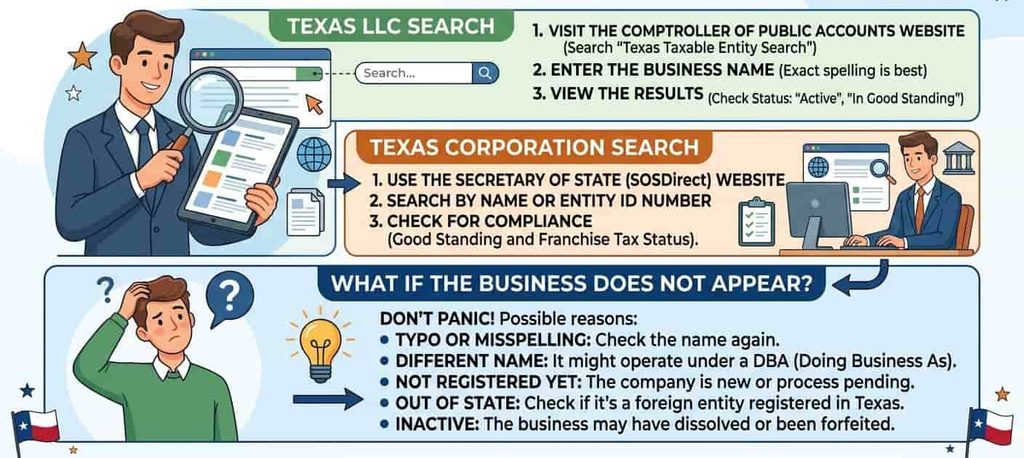
A Texas SOS Business Search can help users locate records for different types of business entities, including LLCs and corporations. The search can start with the company’s legal name or another identifier available in the state record. Once a matching business entity is found, users can review details such as the entity type, registered agent, formation information, filing records, and entity status.
How to Find a Texas Business by SOS File Number
A Texas SOS file number is a useful identifier for locating a particular business entity record maintained by the Texas Secretary of State. It can be more precise than searching by a common business name, especially when multiple companies have similar names. Users who already have this number can enter it in the appropriate SOSDirect search function to locate the related record and review available entity information and filing records.
What Is a Texas SOS File Number?
A Texas SOS file number is an identification number assigned to a business entity record by the Texas Secretary of State. It is associated with the entity’s state record and can help distinguish one company from another.
The file number can be useful for:
- Identifying a specific entity record
- Locating business records with similar names
- Finding related filing information
- Referencing an entity in state records
The Texas SOS file number is different from a taxpayer number issued for tax-related purposes.
Where to Use the File Number
The file number can be entered through the appropriate SOSDirect business organization search function. Select the filing number search option and enter the number associated with the entity record. The results can help you locate the matching business and review available entity information, including filing records and other state-record details.
File Number vs. Taxpayer Number
A Texas SOS file number and a taxpayer number identify different types of records. The SOS file number is connected to a business entity record maintained by the Secretary of State. The Texas Taxpayer Number is used by the Texas Comptroller for taxpayer accounts and tax-related records.
| Feature | Texas SOS File Number | Taxpayer Number |
|---|---|---|
| Agency | Texas Secretary of State | Texas Comptroller |
| Main use | Entity and filing records | Taxpayer records |
| Record type | Business entity | Tax account |
| Search system | SOSDirect | Comptroller search |
How to Check Texas Business Entity Status
A Texas Secretary of State Business Search can help you review the status shown for a business entity in the Secretary of State’s records. Status information should be read together with other record details, such as the entity name, entity type, registered agent, and filing history. Texas maintains separate business registration and tax records, so a status shown by one agency does not automatically establish every aspect of a company’s legal or tax position. Reviewing the appropriate state records can provide a more complete record check.
What Entity Status Tells You
The entity status shown in a Texas SOSDirect search reflects information maintained in the Secretary of State’s business records. It can help you see the current status associated with the entity’s state registration record.
When reviewing the record, check:
- Entity status
- Legal business name
- Entity type
- Registered agent
- SOS file number
- Filing information
Why SOS Status and Tax Status Are Different
The SOS registration status and tax-related status come from different state records and address different matters. The Texas Secretary of State maintains business registration records, including information available through SOSDirect. The Texas Comptroller of Public Accounts maintains tax-related records, including information about franchise tax and an entity’s right to transact business for applicable taxable entities.
These records should be viewed separately:
- SOS registration status: relates to the entity’s Secretary of State registration record.
- Right to transact business: relates to the Comptroller’s tax account information.
- Franchise tax: concerns applicable Texas tax obligations and related account status.
When to Verify Status Through Both Agencies
For a broader business record check, review the Secretary of State record and relevant Comptroller information separately. A SOSDirect search can provide entity registration details, registered agent information, and filing records. The Texas Comptroller can provide applicable tax account and right to transact business information.
Using both sources can help you compare:
- SOS registration status
- Right to transact business
- Franchise tax information
- Entity and filing records
How to Find a Registered Agent in Texas
A registered agent is the person or organization designated to receive legal process, notices, and demands on behalf of a Texas business entity. Texas filing entities must maintain a registered agent and registered office in Texas. The Texas Secretary of State records can show the registered agent and registered office connected with a business entity.
Where Registered Agent Information Appears
When reviewing entity information through the Texas Secretary of State system, look for the registered agent and registered office details associated with the business record. The registered office must be a physical Texas address where the registered agent can receive service of process during normal business hours.
This information can help you:
- Identify the registered agent listed for the entity
- Find the registered office address
- Review the official business record
- Compare current information with related filings
Registered Agent vs. Owner
How to Check Texas Business Name Availability
A Texas SOS Business Search can help you review existing entity names before forming a new business. The Texas Secretary of State provides SOSDirect services for business entity searches and name-related filings. Existing records can show whether a similar legal name is already listed in state records. A name search is useful for preliminary research, yet search results alone do not confirm that a proposed name will be approved for a new business filing.
Search Existing Texas Entity Names
Start by searching Texas business records through the Secretary of State’s entity search service. Enter the proposed legal name and review the results for businesses with similar names. Pay attention to matching words, abbreviations, punctuation, and entity identifiers that may appear in existing records.
Check details such as:
- Existing entity name
- Entity type
- Entity status
- Similar name variations
- Related business records
What “Distinguishable” Means
Texas business name rules use the concept of a name being distinguishable from other entity names already on record. A proposed name should be compared with existing records rather than judged only by how different it appears in everyday use. Minor changes in punctuation, spacing, wording, or similar elements may not make two names distinguishable. The Secretary of State’s name availability process provides the official determination connected with a business filing.
Search Results Do Not Guarantee Approval
Finding no obvious matching name through a Texas Secretary of State Entity Search does not guarantee that a proposed business name will be approved. The Secretary of State reviews the proposed name under applicable Texas requirements when a formation or registration filing is submitted. Business names can change as new entities are filed with the state. A search result should, therefore, be treated as preliminary research rather than confirmation of final name approval.
Entity Name vs. Trademark
An entity name is the legal name recorded for a business entity with the state. A trademark is separate legal protection for a name, phrase, symbol, or other identifier connected with goods or services. A Texas entity-name search does not establish trademark rights. A proposed business name should be checked separately for state filing requirements and potential trademark conflicts. This distinction can help prevent confusion between state business registration and trademark protection.
How to Get a Certificate of Fact or Copies of Filings
The Texas Secretary of State provides Certificates of Fact and copies of business filings through SOSDirect and other ordering methods. These records can provide formal evidence or copies of documents maintained by the Corporations Section. Available options include plain copies, certified copies, and certificates of fact.
What Is a Certificate of Fact?
A Certificate of Fact – Status is an official certificate issued by the Texas Secretary of State. It provides official evidence concerning an entity’s existence or authority to transact business in Texas and states the entity’s current legal name, formation or registration date, and status. The Secretary of State lists the Certificate of Fact – Status separately from the Texas Comptroller’s tax-related certificate of account status. A Certificate of Fact can be ordered through SOSDirect using the entity’s SOS file number. If the file number is unknown, the SOSDirect ordering process provides a Find Entity option for searching by name.
How to Order Copies of Business Filings
SOSDirect provides several options for obtaining business records and filed documents. Users can review filing history and retrieve available imaged documents. Plain copies can be printed or ordered, and certified copies can be requested when certification is needed.
Options include:
- Plain copies of filed documents
- Certified copies
- Imaged documents
- Certificates of Fact
- Filing records such as a Certificate of Formation
When You May Need a Certificate
A Certificate of Fact – Status can be useful when formal evidence of an entity’s status is requested. The Texas Secretary of State notes that a certificate of status may be required when qualifying or registering a business in another jurisdiction. Other situations can include:
- Business verification
- Banking matters
- Registration in another jurisdiction
- Formal business records
Certificate Verification
The Texas Secretary of State provides an online certificate verification service for qualifying certificates issued by its Corporations Section. Users can enter the document number shown on the certificate to verify that the certificate was issued by the Secretary of State. The service applies to qualifying certificates of filing and certificates of fact connected with business organization records.
Texas SOSDirect Search Fees and Access
Texas SOSDirect provides online access to Texas business entity records, filing information, and related services. The Texas Secretary of State currently lists a statutory fee for each SOSDirect search. Separate charges apply when ordering copies or certificates.
Account and Payment Requirements
SOSDirect can be used with an existing account, and the Secretary of State provides account and payment options for online transactions. Payment details are entered during the applicable transaction, with available payment methods shown by the system. For certificate and copy orders, the official instructions provide options for using a client account, credit card, or LegalEase payment method.
Additional Costs for Documents and Certificates
Document and certificate charges are separate from the basic SOSDirect search fee. The Texas Secretary of State’s published fee information lists the following charges:
Texas SOS Business Search vs. Texas Comptroller Entity Search
Texas has separate systems for business registration records and tax-related records. The Texas Secretary of State maintains entity and filing information, while the Texas Comptroller maintains taxable entity and franchise tax information. The table below shows which system is relevant for different types of business information.
Frequently Asked Questions
The Texas Secretary of State Business Search can raise questions about entity searches, SOSDirect, filing records, business names, and available entity information. The FAQs below explain common search methods, fees, LLC and corporation searches, and how a Texas SOS file number can help locate a specific business record.
How do I search for a business with the Texas Secretary of State?
You can search for a business through the Texas Secretary of State’s SOSDirect system. Use the available entity search option and enter the business’s legal name or another identifying number, such as a Texas SOS file number. Review the matching records and select the entity that corresponds with the business you need.
Is the Texas SOS Business Search free?
The SOSDirect system currently charges a $1 statutory fee for each search. This is separate from other official Texas state search resources that may provide certain business or tax information without the same search charge. Copies, certificates, and other documents ordered through SOSDirect can have separate fees based on the service requested.
What is SOSDirect?
SOSDirect is an online service operated by the Texas Secretary of State. It provides access to certain business filings, entity search functions, document orders, and other Secretary of State services. Users can perform an entity search and locate available business records using information such as an entity name or filing number.
Can I search for a Texas LLC?
Yes. You can search for an LLC through the Texas SOS Entity Search using identifying information available for the business. The search can help locate the matching business entity and review available information such as its legal name, entity type, status, registered agent, formation date, and filing records.
Can I search for a Texas corporation?
Yes. A corporation can be located through the Texas Secretary of State’s business entity records. A TX Sec of State Corp Search can help you find a corporate record by searching available identifying information, such as the legal business name or SOS file number, and then reviewing the matching entity details.