

Texas company search provides a convenient way to look up business entities recorded by the Texas Secretary of State. SOSDirect allows users to search company records using available business information and review details connected with registered entities. Search results may include an entity’s legal name, file number, status, entity type, and registered agent information. This information can support business research, name checks, vendor reviews, and other situations where current Texas entity records are relevant to a specific company or organization.
Texas company search through SOSDirect can help users locate existing Texas business records and review information maintained by the Secretary of State. A search may begin with a company name, file number, or other available record details. Users can compare search results to identify the correct entity and review its filing information. SOSDirect may require a fee for certain searches or record requests, so the cost can depend on the type of information or document requested during the search process.
How to Search a Business on SOSDirect
The Texas Secretary of State provides an official SOSDirect information page for users who need to search Texas business records or use other online business services. The page explains how SOSDirect works and provides information about account setup, search charges, and online availability.
- Texas SOSDirect:
- https://www.sos.state.tx.us/corp/sosda/index.shtml
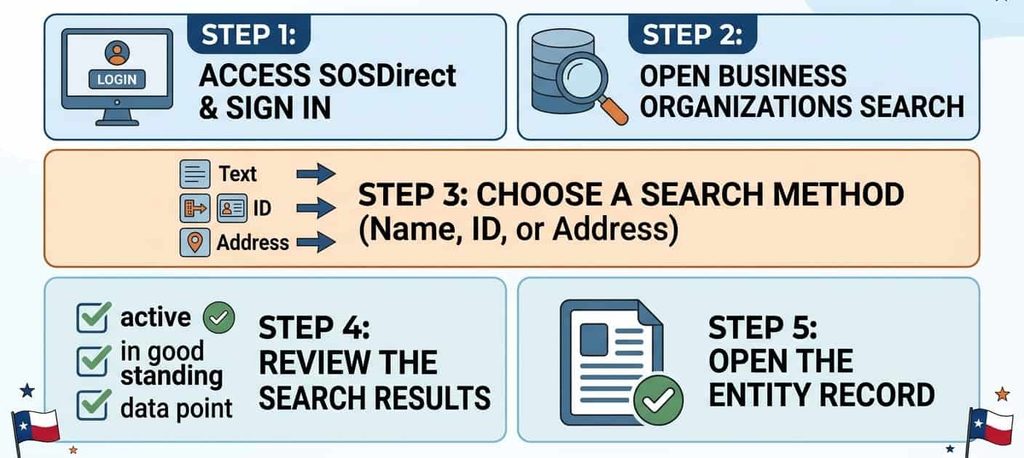
Access SOSDirect and Sign In
Start by opening the official SOSDirect system and follow the SOSDirect login instructions. An SOSDirect account or SOS Client Account may be required for certain transactions and services. New users can follow the account creation process provided by the Texas Secretary of State. SOSDirect provides online services that can be used 24 hours a day, seven days a week. Search and payment requirements depend on the service selected. A $1 statutory fee currently applies to each SOSDirect search, with separate charges for certain documents and certificates.
Open Business Organizations Search
After entering SOSDirect, go to the Business Organizations area and select the business organization inquiry or search option. This section provides the business entity search functions used to locate Texas business records. The Texas SOSDirect search can be started using information available about the entity, such as its legal name or SOS file number. Select the search field that matches the information you have before submitting the search.
Choose a Search Method
Choose the search method based on the information available. An entity name search can help locate a business when you know its legal name or part of its name. A file number or SOS file number can identify a particular Secretary of State record. A taxpayer number may be used where the system provides that search option. A FEIN or EIN may be available as an identifying detail in certain records or related state searches. Review the available fields shown by SOSDirect and enter the information requested for that search type.
Review the Search Results
After submitting the search, review the matching entities before selecting a record. When you search business entities, compare the legal entity name, entity type, file number, and entity status shown in the results. Similar business names can produce multiple records, so check the identifying information carefully. Look for the entity that matches the company you are researching. Selecting the correct result opens the available entity information and provides more details about the business record. If the result does not match, return to the search and try another available search method.
Open the Entity Record
After selecting the correct entity, review the available record details. Depending on the record, you may find the filing history, registered agent, registered office, entity names, assumed names, and related filing information. SOSDirect instructions provide options such as Filing History for reviewing filings and View Image for viewing available document images. These options can help you review filed documents connected with the selected business entity.
How to Search Texas Business Entities by Name
A Texas business search SOSDirect can help locate a business entity by its recorded name. The Texas Secretary of State provides search functions for business entities and entity information through SOSDirect. A name search can produce several records, so reviewing the full entity details is important before selecting a business.
Search by Entity Name
Start with the entity name or known legal business name. If the full name is available, enter it into the business entity search. A partial name can be useful when the complete legal name is unknown. Try reasonable spelling variations or different entity designators, such as LLC, Inc., or Corporation, when a first search does not produce the expected record. SOSDirect provides business searches that can locate entity information by name. A search may return several businesses with similar names. Review the results rather than selecting the first match. Keep the entity’s file number available once you identify the correct record. This number can help you return to the same entity record for later searches or document orders.
How to Identify the Correct Business
A business name alone may not be enough to identify the correct record. Compare several fields shown in the search results or entity record:
How to Search by Texas SOS File Number
A file number provides a direct way to locate a particular Texas business entity record. The Texas Secretary of State’s SOSDirect instructions show that users can select Filing Number Search, enter the filing number, and open the related entity record. If the number is unknown, the instructions provide a name-search option through Find Entity.
Why the SOS File Number Matters
An SOS file number helps distinguish one business record from another when several entities have similar names. A name can change, contain common words, or closely resemble another entity name. The file number is tied to the Secretary of State’s entity record, making it useful when you need to return to a particular record. Once the correct entity is located, the record can show information such as the legal name, entity type, status, registered agent, filing history, and other available record details. The file number can further help when ordering copies or certificates through SOSDirect.
Filing Number Search vs. Entity Name Search
Both methods can locate a Texas business, but they work best in different situations.
What Information Does a Texas SOSDirect Search Show?
A Texas SOSDirect search can provide several types of information connected with a business entity record. The available record can include the legal entity name, filing number, entity type, filing dates, status, registered agent, filing history, names, assumed names, management information, associated entities, and available document images. The exact fields can vary by entity and record.
Entity Name and File Number
The entity record can show the business’s legal name and its filing number. The filing number is assigned by the Texas Secretary of State and can help identify the particular record. Keeping this number can make later searches easier, especially when several businesses have similar names or when requesting copies of filed documents.
Entity Type and Formation Date
The record can identify the entity type, such as a domestic or foreign corporation or another business structure. It can display an original filing date and, where applicable, a formation date. These dates can help establish when the record was filed or when the entity was formed according to the information maintained by the Secretary of State.
Registered Agent and Registered Office
A Texas entity record can include the registered agent and registered office information. The registered agent is designated to receive service of process for the entity. The registered office is associated with the agent’s service address. These details can help identify the official contact information recorded with the Secretary of State.
Filing History and Documents
The filing history provides a record of filings associated with the entity. SOSDirect instructions state that users can select Filing History after opening an entity record. Where an image is available, the View Image option can open the filed document as a PDF. The record can include filing dates, document numbers, filing types, effective dates, and page counts.
Entity Status
The entity status shows the status recorded in the Secretary of State’s entity record. The status should be read together with the other information shown for that business. A sample Texas SOSDirect record displays an entity status alongside the filing number, original filing date, entity type, and other record fields. This makes entity status one part of the broader business record.
SOSDirect Fees for Texas Business Searches
SOSDirect fees depend on the type of search, copy, or certificate requested. The Texas Secretary of State currently lists a fee for each SOSDirect search. Separate charges apply to plain copies, certified copies, Certificates of Fact, and Long Form Certificates of Existence.
How Much Does a SOSDirect Search Cost?
The Texas Secretary of State lists this as a statutorily authorized search fee. The fee applies when a search is performed through SOSDirect, but the state provides an exception when an order or filing is placed directly from the search results. In that situation, the search fee is not charged.
Copies and Certificates Fees
Copies and certificates have their own charges and should be kept separate from the basic search fee. The current Texas Secretary of State fee schedule lists the following amounts:
How to Order Copies and Certificates Through SOSDirect
SOSDirect provides options to order copies, certificates, and other records connected with Texas business entities. Users can review available filing records, view imaged documents, or place an order for a plain or certified copy. The Secretary of State provides separate instructions for certificates of fact and document copies.
Viewing Imaged Documents
After locating an entity, users can open its Filing History and select View Image for a filing that has an available document image. The document opens as a PDF that can be saved or printed. If the View Image field shows N/A, the document is not available through that viewing option, and the user can use the Order function to request a copy. Plain copies are charged at $0.10 per page.
Ordering Plain Copies
Plain copies are uncertified copies of documents maintained by the Texas Secretary of State. From the entity record, users can select the document or documents they need and place an order through the SOSDirect copy-order process. If the document is already imaged, it may be available for immediate printing through the View Image option instead of requiring a separate copy order.
Ordering Certified Copies
Certified copies include certification from the Texas Secretary of State. Through SOSDirect, users can select the certified-copy order type, enter the SOS file number, choose the document or documents, and submit the order. The Secretary of State states that certified copies of imaged documents are emailed within 24 hours, with longer processing possible for documents that are not yet imaged.
Certificate of Fact – Status
A Certificate of Fact – Status is an official certificate issued by the Texas Secretary of State. It provides official evidence of an entity’s existence or authority to transact business in Texas and includes the current legal name, formation or registration date, and status statement. The Secretary of State describes this certificate as the equivalent of a Certificate of Good Standing or Certificate of Existence.
SOSDirect Business Search for Name Availability
A Texas company search can help you check existing entity names before choosing a name for a new business. SOSDirect records can show names already associated with Texas entities, making a Texas business name search useful at the early stage of name selection. Texas law requires a proposed entity name to be distinguishable in the Secretary of State’s records from certain existing entities, name reservations, and name registrations. A search can give you useful information, but it does not create a final approval of your proposed name.
Search Existing Texas Entity Names
Start with the proposed entity name and search Texas Secretary of State records for existing businesses with the same or similar wording. Review the results for the entity name, entity type, and other record details that may help identify a possible conflict. Texas uses rules to determine whether names are distinguishable, so a name that looks different to you may still require further review under the state’s naming rules.
A useful name availability check can include:
- Searching the main business name
- Checking similar spellings or wording
- Reviewing existing LLCs and corporations
- Checking names already reserved or registered with the Secretary of State
- Reviewing the results for names that could create a filing conflict
Is a SOSDirect Search a Guarantee That a Name Is Available?
No. A SOSDirect search is not a guarantee that an entity name will be accepted for filing. Texas requires a proposed name to meet the state’s distinguishability rules, but the final determination is made after the Secretary of State receives and processes the filing. The agency states that preliminary name clearance does not establish final approval. This means a search result showing no obvious conflict should be treated as an initial check. The Secretary of State reviews the proposed name under applicable Texas Business Organizations Code provisions and administrative rules during processing. A name can still be rejected if it does not meet those requirements. The agency further states that preclearance or formation under a name does not authorize use of that name in violation of another person’s rights.
Name Reservation and Name Availability
Searching, name availability, reservation, and filing are separate steps. A search checks existing Secretary of State records. Name availability concerns whether the proposed entity name meets Texas naming rules. A reservation places an eligible name on record for a limited period; Texas name reservations last 120 days and can be renewed under the applicable rules. Filing creates the entity or registers the foreign entity after the Secretary of State processes and accepts the filing.
SOSDirect vs. Texas Comptroller Business Search
Texas business records are handled through separate state systems. SOSDirect focuses on Secretary of State entity and filing records, while the Texas Comptroller search focuses on franchise-tax and taxable entity information.
Frequently Asked Questions
The Texas Secretary of State Business Search can help users find Texas entity records, filing details, registered-agent information, and other business records maintained by the Secretary of State. The FAQs below explain common questions about SOSDirect business search, search fees, accounts, and searching an entity by name.
How do I search for a business with the Texas Secretary of State?
You can use the Texas Secretary of State Business Search through SOSDirect to look for a Texas business entity. A SOSDirect business search can be performed using an entity name or other available identifying information, such as an SOS file number. Search results can show the legal entity name, entity type, status, file number, and registered-agent information.
Is the Texas SOSDirect business search free?
No. SOSDirect fees include a $1 statutory search fee for each business entity search. The fee applies when you perform a search through SOSDirect. The $1 search fee is not charged when you place an order or filing directly from the search results. Copies and certificates have separate fees based on the type of document ordered.
Do I need a SOSDirect account to search?
SOSDirect provides an online system for Texas business entity searches and related services. A user may need to sign in or create a SOSDirect account to use certain functions. The SOSDirect login process is separate from the information shown in business entity records. Some copy and certificate orders can be placed without maintaining a regular SOSDirect account.
Can I search a Texas business by name?
Yes. A Texas SOSDirect search can be performed using an entity name. Enter the business name or a portion of the name to find matching Texas entity records. Search results can include multiple businesses with similar names, so review the entity name, entity type, SOS file number, status, and other available details to identify the correct record.